Self-initiated study · Nonprofit · Youth services · 2026
LanternhouseA porch light, left on.
A complete website for a fictional Charlotte nonprofit, built to find out what I would make if the only brief was the person who needs help most.
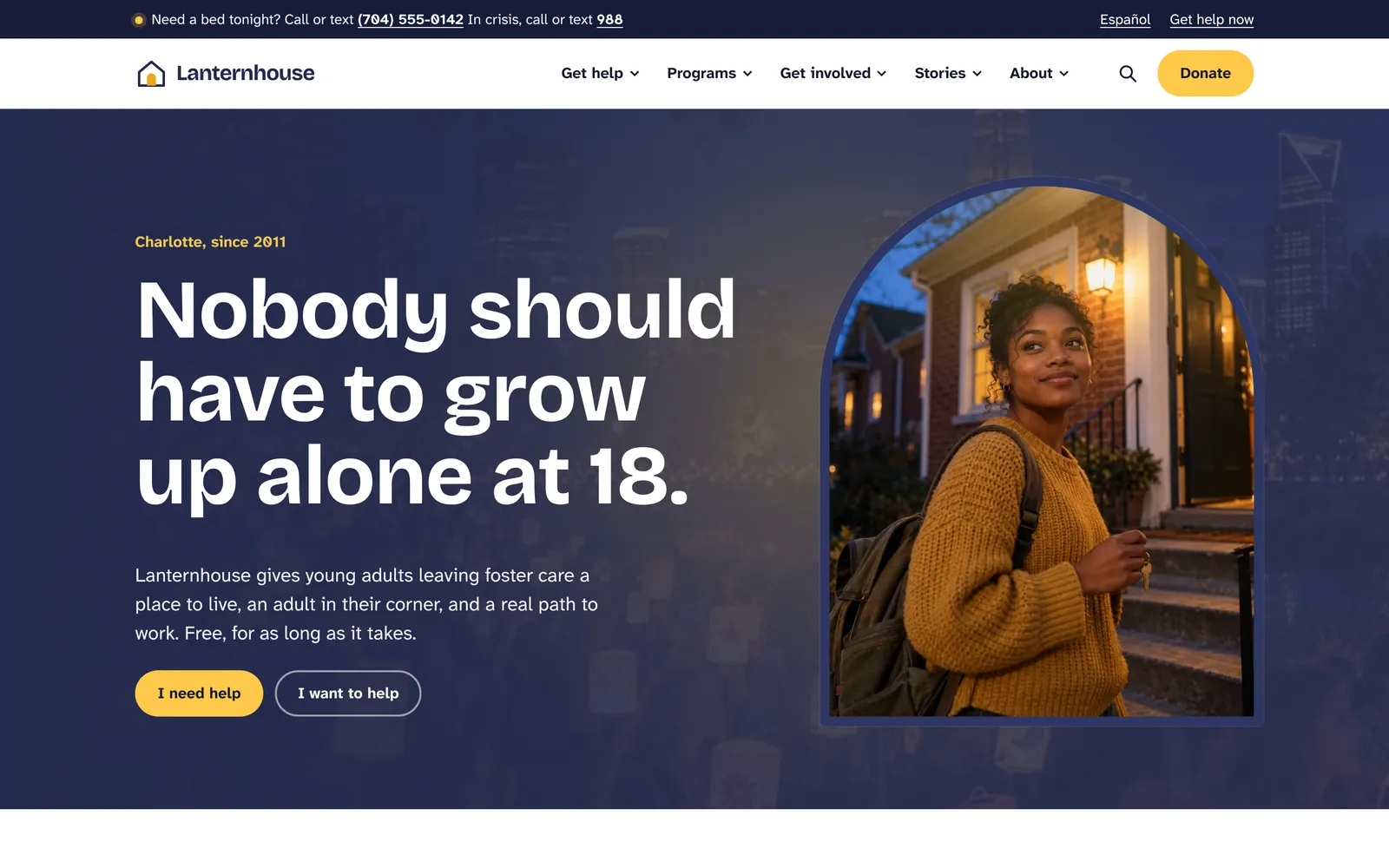
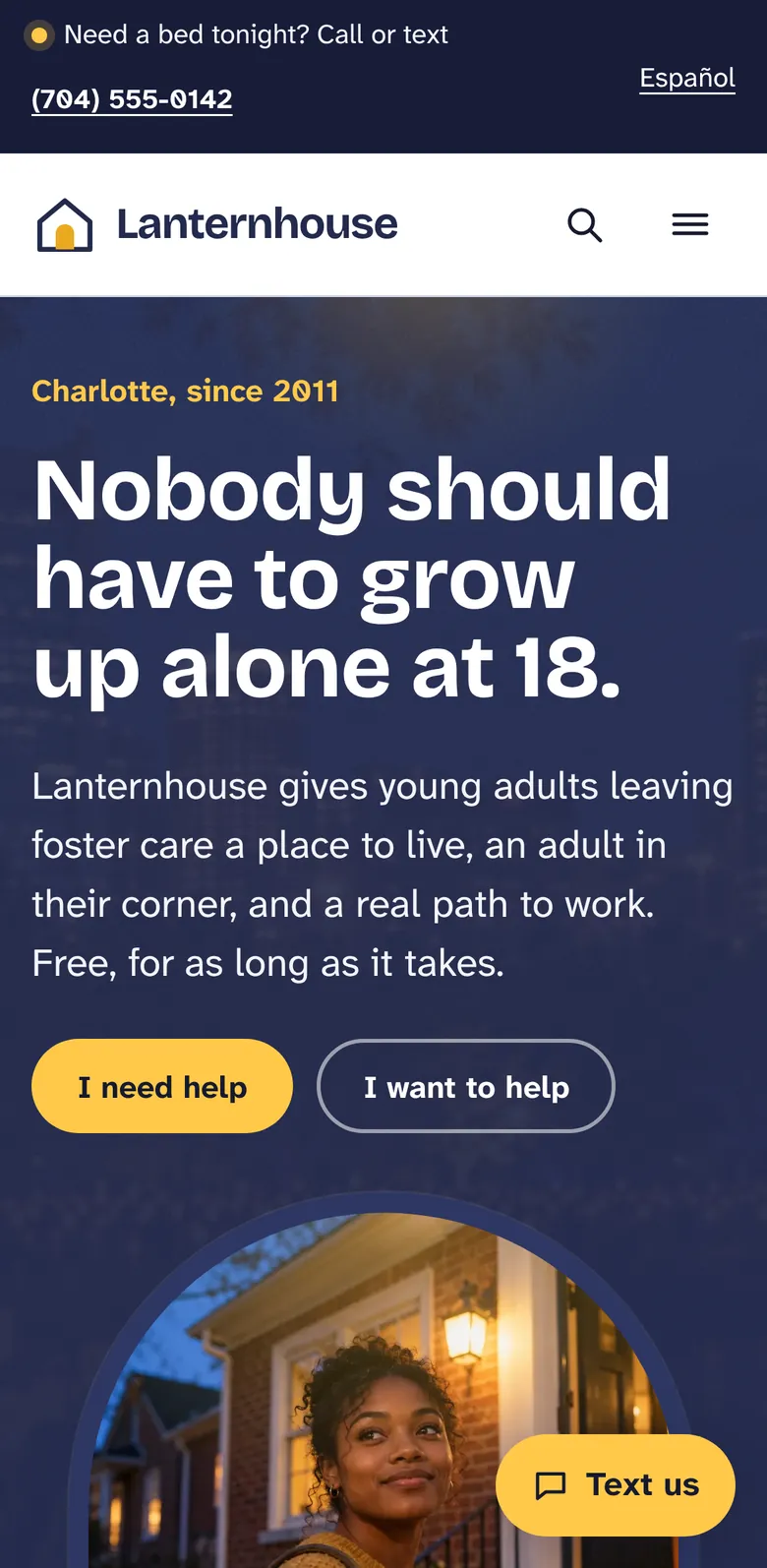
Lanternhouse serves young adults aged 16 to 24 leaving foster care in Charlotte, North Carolina. I wrote the brief, invented the organization in full, art-directed every photograph and built the site from a single content file. I set myself one rule: design for a 19-year-old on a cracked phone, at night, with nowhere to sleep, and let everything else follow.
- Organization
- Fictional, invented for this study
- Role
- Brief, content, art direction, design and development
- Platform
- Python static generator, hand-written CSS and JavaScript, Vercel
- Built
- October 2026, with a design refresh the same month
- Languages
- English, with a Spanish landing page
Two ways to read this. Every chapter opens in plain language: what changed, and for whom. Technical readers can open Under the hood for the engineering.
The brief
Build a believable nonprofit site robust enough to run a real organization: a help pathway, six programs, giving, volunteering, events, stories, news, financials, careers and press.
The method
Write for the hardest visitor first, grow one identity from one image, generate every page from one content file, then measure on real browsers and fix what the numbers show.
What it shows
How I work when nobody sets the constraints: content-led structure, accessibility as a starting point, motion with rules, and an honest record of what still needs work.
The brief
A brief I wrote, and the rules I set myself
Most portfolio concepts are a few beautiful screens. I wanted the opposite: a whole organization, with the depth that a board, a funder and a 19-year-old would each test in their own way.
So the brief came first, written as if a client had handed it to me. Invent a Charlotte nonprofit for young adults aging out of foster care. Give it a founder with lived experience, a leadership team, a board, six programs, a drop-in center, financials and job postings. Then build every page those things imply.
Two guardrails were set before any design work, because a fictional help site carries a real risk. The only working phone numbers are real crisis lines (988, 911 and 211); the organization's own numbers use the 555 range reserved for fiction. And the site asks search engines not to index it.
- A written brief with scope, audiences and success criteria
- A complete organization: leaders, board, programs, numbers
- Safety guardrails decided before the first sketch
Under the hoodFor technical readers
- Brief structured like a client intake: audiences, goals, required sections, constraints and what success looks like.
- Content model written before layout: every program answers who it's for, what you get and how to start; stories, events and news share one schema.
- noindex sent as an X-Robots-Tag header at the edge and noted in robots.txt, plus a footer line on every page naming the site as a concept.
- Organization numbers in the 555-01xx range set aside for fiction; real crisis lines kept accurate.
Audience
Designing for the hardest visitor first
The most important person who visits this site is 19, on a cracked phone with a weak signal, at night, with nowhere to sleep. If the site works for her, it works for the caseworker, the volunteer and the donor too.
Every page keeps a way to reach a person within one tap: a utility bar with the phone number, a Text us button that stays on screen on phones, and a help strip at the end of program pages. The home page asks one question, Where do you want to start?, and gets anyone to the right place in three clicks or fewer.
A three-question eligibility check tells young people what they qualify for without ever asking for a name.
- One question, four plain answers, three clicks to anywhere
- A Somewhere to sleep tonight page written as numbered steps
- Eligibility without identity: no name, no email, nothing saved
Under the hoodFor technical readers
- The pathway hero is progressive enhancement: each lane is a real link, and JavaScript turns it into an in-place path with a three-step progress line.
- The Text us button tucks away while scrolling down, returns on scroll up, clears the iPhone home indicator and hides at the footer.
- The eligibility check runs entirely in the browser; answers are never sent or stored.
- Help pages written in plain language, at about an eighth-grade reading level.
Identity
One image, one system: a porch light left on
The organization is built on one image, a porch light left on for someone coming home late. The visual system grows from it: deep dusk blues, a single lamplight yellow, and an arched window frame that holds every key photograph.
On load, the window on the home page warms up as if someone just switched on the light. It is the only motion on the site that happens without the visitor doing anything.
Headlines are set in Bricolage Grotesque for warmth and a little youthful irregularity. Body text uses Atkinson Hyperlegible Next, designed by the Braille Institute, because many young people leaving care have had interrupted schooling or uncorrected vision.
- Two colours, used with discipline
- Arched frames that make every photograph feel like a window
- A typeface chosen for the reader, not the designer
Under the hoodFor technical readers
- Colour tokens on :root. Yellow is reserved for actions and light, never decoration; body text pairings meet 4.5:1.
- Fonts self-hosted and preloaded, so no request leaves the domain.
- The arch is a static clip-path, so a moving photograph can never escape the shape in Safari.
- The window warm-up is a single opacity transition, skipped entirely under reduced motion.
Content architecture
Fifty pages that answer real questions
A believable nonprofit site is mostly content, so I wrote it as content strategy before it became pages. Every program page answers the same three questions in the same order: who it's for, what you get, and how to start.
Around the programs sit the pages a real organization needs and concept sites usually skip: a transparency page with spending and revenue, a wishlist for household items, careers, press, an accessibility statement that lists known issues, and a donor privacy policy.
Stories are written about outcomes, not rescue. Each one leads with the young person's own words.
- Six programs on one consistent template
- Financials, careers, press and policies, not only marketing pages
- Site search across every page, opened with the slash key
Under the hoodFor technical readers
- One Python content file generates every page; templates share a single component vocabulary.
- Structured data on every page: NGO, WebSite with search, Service, Event, NewsArticle, FAQPage, Person and BreadcrumbList.
- Native dialog elements for search and the mobile menu, so focus is trapped and returned correctly.
- Skip link, landmarks, breadcrumbs and a logical heading outline on every page.
Giving
Asking for a gift the way a good fundraiser would
The donate page leads with monthly giving, because a steady gift is worth more to an organization like this than a larger single one. Choosing an amount changes the line beneath it to say what that amount does: $100 covers a week of dinners at The Porch for 15 young adults.
Tribute gifts, covering the processing fee and other ways to give sit on the same page. People who would rather give things than money get a wishlist instead of a dead end.
- Monthly first, with one-time a tap away
- Impact language that changes with the amount
- A next step for every kind of donor
Under the hoodFor technical readers
- The form validates in the browser and, in this study, never sends data; in a real engagement it hands off to the organization's payment processor.
- Amounts and impact lines are content, so staff could change them without touching code.
- A donor privacy policy written to match the no-tracker build.
Art direction
Art-directing photographs that don't exist yet
There was no photo library, so I wrote one. Every image began as written art direction: a house style describing camera, lens, light and film stock, then a shot brief for each frame saying who is in it, what they are doing and how it should feel.
The house style asks for documentary realism: candid, unposed, natural skin texture, Charlotte in the evening, deep blue shadows and warm lamplight. The seven leadership portraits were made in one session so light and background match across the series.
Like the organization, every person pictured is invented. In a real engagement the same document becomes the brief for a photographer and the people the organization serves.
- 33 frames, each with a written purpose and an exact crop
- A house style that keeps every image in one visual world
- Every person pictured is invented, like the organization
Under the hoodFor technical readers
- Shot briefs live in one document with file names, aspect ratios and final pixel sizes.
- A fetch script pulls the originals from a shared folder by file ID, and falls back to the live images if access is withdrawn.
- An optimization script crops each image to its slot, writes WebP at the sizes needed and builds the share image.
- Content-hashed image URLs, so a replaced photo is never hidden by a stale cache.
Motion
A design refresh, and the rules it taught me
After the first build I layered five current design trends on top: smooth page transitions, a paragraph that lights up word by word as you read, a photo bento grid, headlines that settle into weight as they arrive, and a fine film grain on the dusk bands.
The first version stuttered. Scroll-driven shape animations on photographs were forcing the browser to repaint constantly. I replaced them with simple fades and rises that run once, and repaints while scrolling the home page dropped from 2,959 to 319.
Testing in Safari found two more problems: moving photographs escaping their rounded frames, and an animated blur that now and then crashed the page. Both were fixed, and both became written rules for every site that came after.
- Photographs only fade and move. Nothing animates a shape.
- Every moving image sits inside a static clip
- Reduced motion turns all of it off
Under the hoodFor technical readers
- Cross-document View Transitions keep the header still while pages crossfade; Speculation Rules prerender on hover.
- Entrances use opacity and transform only, triggered once by IntersectionObserver.
- The Safari clipping bug fixed by wrapping images and glow layers in a span with a static clip-path.
- An intermittent WebKit crash reproduced by repeating the same load and scroll a dozen times, then traced to animated filter: blur on headline words.
Mobile and performance
Fast on a slow phone, and measured
All 50 pages were checked at 360 and 390 pixels wide: no sideways scrolling, every control at least 44 pixels to tap, and no form field small enough to make an iPhone zoom in.
Hover effects only run on devices that hover, so nothing sticks after a tap, and phones get smaller images than desktops. On a throttled mid-range phone over slow 4G, the home page shows its main content in about 1.5 seconds, with nothing jumping as it loads.
- No horizontal overflow on any of the 50 pages
- Touch targets of 44 pixels or more, footer links included
- About 1.5 seconds to main content on throttled slow 4G
Under the hoodFor technical readers
- Under 120 KB of HTML, CSS, JavaScript and fonts on the home page's first load, before photography.
- Fingerprinted CSS and JavaScript cached for a year at the edge.
- Hero backdrops load only once the page is idle, and are skipped on data saver or 2G and 3G connections.
- Responsive images with explicit dimensions; layout shift measured under 0.1 on every page tested.
Privacy and findability
Private by default, findable by design
A young person looking for help should not be followed around the internet for it. The site sets no cookies, loads no trackers or analytics, embeds no social widgets and makes no requests to any other domain. I checked that on twenty page loads, and the count was zero.
Privacy doesn't have to cost findability. Every page carries structured data, canonical URLs, share images and English and Spanish alternates, so a real version would be well described to search engines and AI answer tools alike. A Spanish landing page serves families and young adults who prefer Spanish.
- No cookies, trackers or third-party requests
- A strict Content Security Policy and HSTS
- Structured data and language alternates on every page
Under the hoodFor technical readers
- Content Security Policy allows only the site's own scripts, styles, fonts and images, with frame-ancestors set to none.
- HSTS with preload, a locked-down Permissions Policy and a strict referrer policy.
- noindex sent as a header because this is a concept; a real launch removes one line.
- Forms have visible labels, inline validation and status messages announced to screen readers.
Quality
What an honest audit found
On October 30, 2026 I ran an automated accessibility check (axe-core, WCAG 2.2 AA rules) over ten pages at desktop and phone sizes. Most pages came back clean. Two findings are worth telling you about.
The paragraph that lights up as you read starts its unread words dimmed, and dimmed text fails contrast until it is lit. The fix keeps the effect: start every word at full contrast and light it with colour and weight instead. Separately, the Text us button's accessible name doesn't contain its visible words, which can trip up voice-control users. That one is a single-line fix.
A real engagement would add what a study can't: content shaped with young people who have lived it, testing on their own phones, a real payment processor, and a content system the staff can run.
- Measured, then written down, including what failed
- Two findings, each with a clear remedy
- A plain list of what real work adds that a study cannot
Under the hoodFor technical readers
- axe-core 4 with Playwright across 20 page loads (10 pages, desktop and phone).
- Findings: color-contrast on the scroll-lit paragraph (home only); label-content-name-mismatch on the floating Text us button (phones).
- Same 20 loads: no horizontal overflow, no third-party requests, layout shift under 0.1.
- Fixes logged in the project notes, alongside the motion rules.
Take it with you
The full story, on paper.
The full design brief and a one-page summary, written for teams deciding whether I'm the right partner.