Work

Case study · Nonprofit · Human services · 2026

In Safe CompanyA safe front door for survivors.

Four websites became one bilingual platform, engineered for safety at every click.

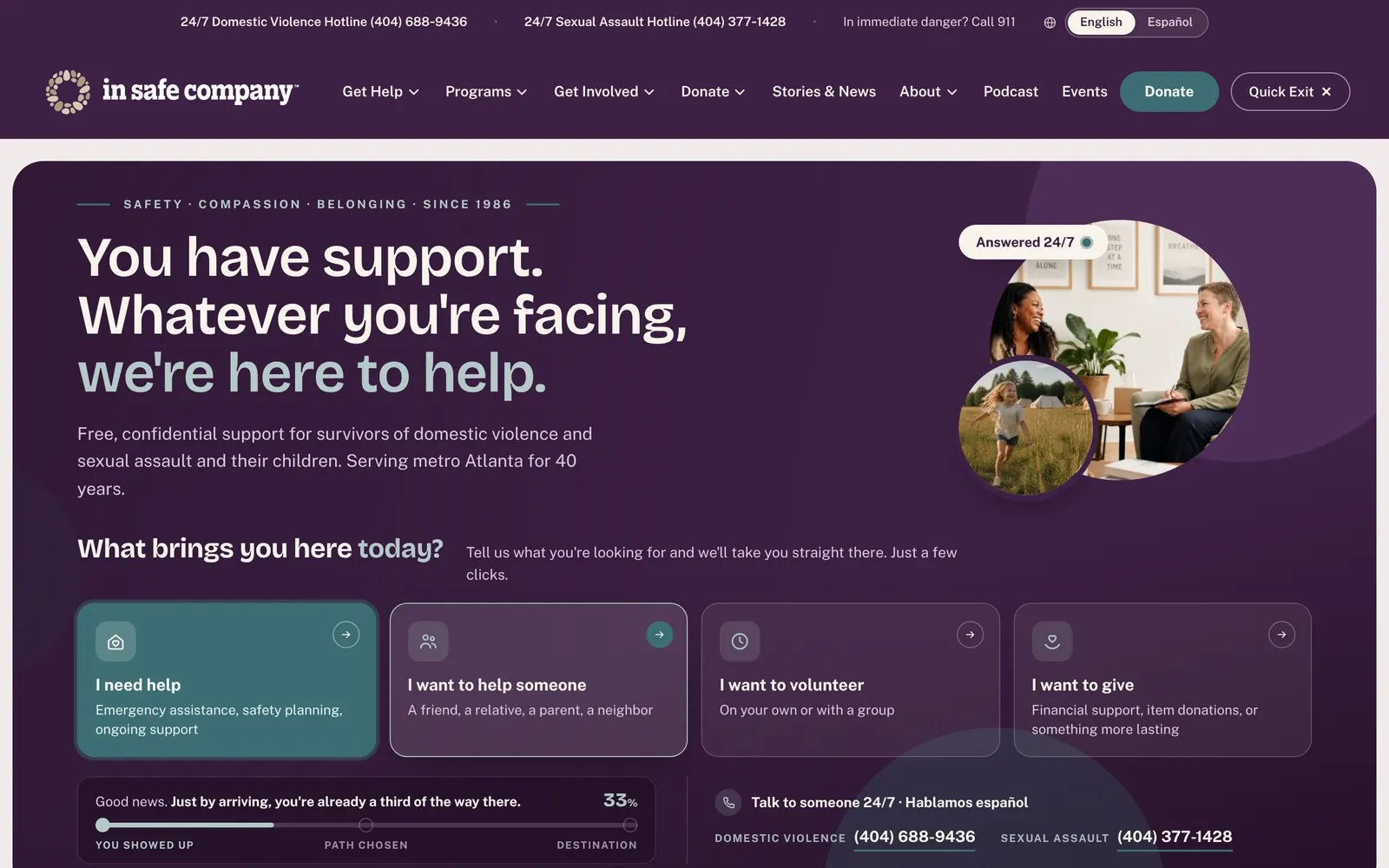
In Safe Company home page with hotline bar and four pathway cards
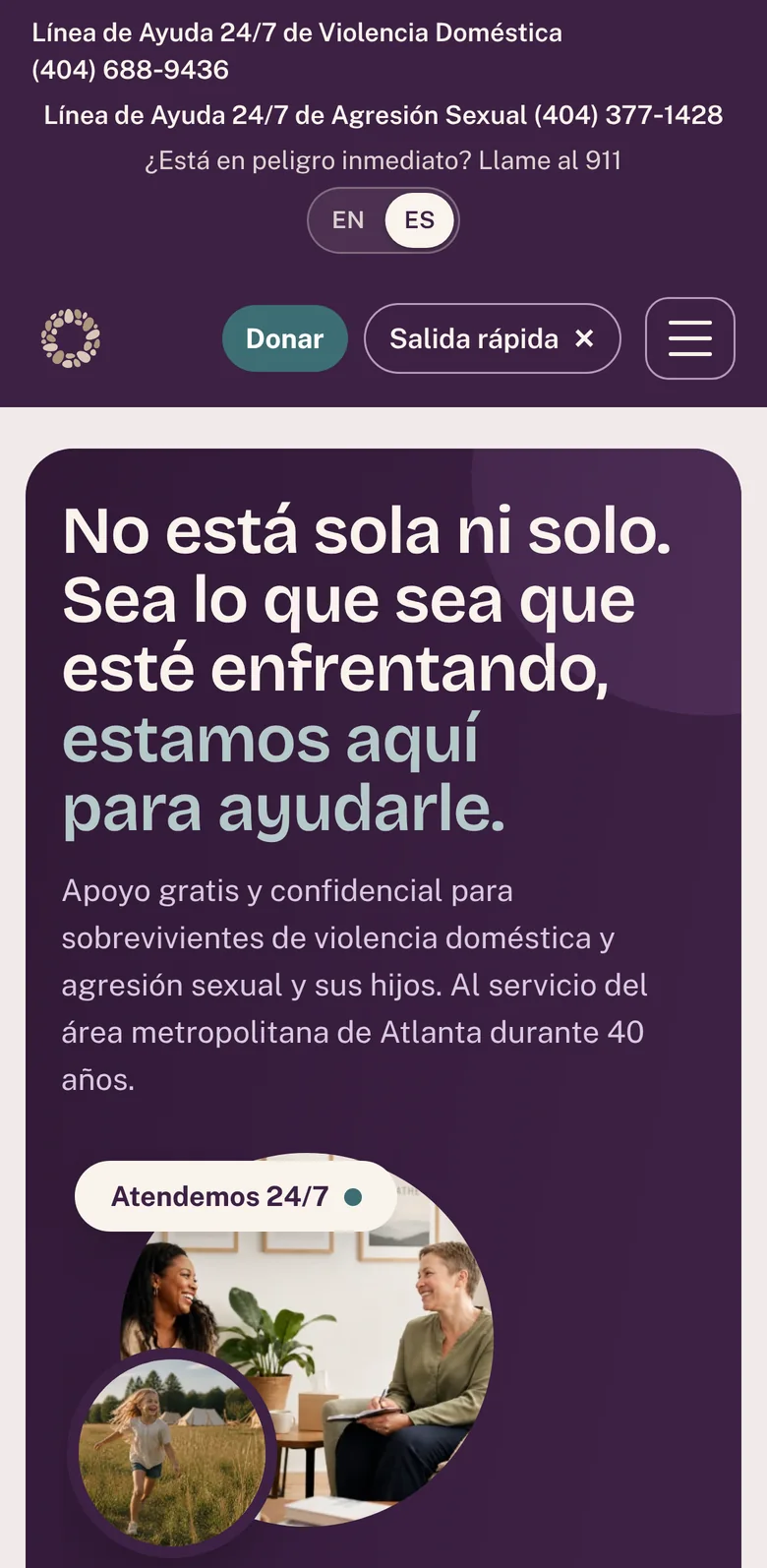
The Spanish home page on a phone

A metro Atlanta nonprofit that has served survivors of domestic violence and sexual assault since 1986 was changing its name. Its story lived on four separate websites. I designed and built the one site that replaced them, with help reachable in two or three clicks, a complete Spanish version, and a Quick Exit engineered like a security feature.

Client
In Safe Company, Decatur, Georgia
Role
Lead designer and developer, end to end
Platform
WordPress multisite, Elementor 4, custom PHP and JavaScript, Kinsta
Timeline
Kickoff Aug 10, live Oct 13, 2026
Languages
English and Latin American Spanish

Two ways to read this. Every chapter opens in plain language: what changed, and for whom. Technical readers can open Under the hood for the engineering.

4 → 1legacy websites consolidated into one
30+pages, in English and Spanish
13custom widgets and plugins
9 weeksfrom kickoff to the live site
448crisis phrases flagged for human review
0internal links redirecting or broken after the launch audit

The challenge

A trusted organization was renaming itself after decades of service, and its programs were scattered across four websites. People in crisis had to decode menus to find help.

The approach

One custom WordPress platform designed around safety: a persistent hotline bar, a hardened Quick Exit, plain-language pathways, and a full Spanish site.

The result

Live on October 13, 2026, during Domestic Violence Awareness Month, with giving, events, a podcast and survivor stories the staff can run themselves.

Strategy

Four sites, one front door

The organization was changing its name after decades of service. Its main site, its summer camp, its supervised visitation center and a placeholder for the new name each lived on a different domain.

Before designing anything, I archived every page of all four sites so nothing would be lost, then showed leadership four working design directions instead of static mockups. The one they approved became the reference for every component in the build.

  • A searchable archive of every legacy page, photo and post
  • Four named design directions, each a working prototype
  • A one-time welcome that tells returning visitors about the new name
Under the hoodFor technical readers
  • Crawled wrcdv.org, camppeaceatl.org, niasvisitation.org and insafecompany.org into an offline copy plus a private archive site with a page tree, full-text search, image galleries and link tables.
  • Wrote a WordPress versus Wix decision paper; the client chose custom WordPress for ownership and extensibility.
  • Built four design directions (Good Company, Atmosphere, Civic, Dawn) as live prototypes in Next.js, Tailwind and Framer Motion, deployed on Vercel for side-by-side review.
  • Guarded the new domain with a branded holding page carrying both hotlines, Quick Exit and email capture until launch.
Next.jsTailwindFramer MotionVercelContent archive
Fig 1.1The rename, told once. Returning visitors see the old logo become the new one.
Fig 1.2Our Story carries the history forward instead of starting over.

Wayfinding

Help in two or three clicks

Someone in crisis should never have to decode a menu. The homepage asks one plain question, “What brings you here today?”, and offers four answers: I need help, I want to help someone, I want to volunteer, I want to give.

Choosing one turns the top of the page into a guided path, with each option labeled by how many clicks remain. Both 24-hour hotlines stay on screen the whole time.

  • One question, four plain answers
  • Every destination within three clicks
  • Hotlines and a Spanish option visible before anything else
Under the hoodFor technical readers
  • Custom Elementor widget (isc-hero) combining the brand hero with a pathway engine. Content is a flat repeater of keys and parent keys, up to three levels deep, so staff can edit the tree without code.
  • The editor flags broken parent keys, dead-end cards and cards nested too deep.
  • Escape never steps back through the path; it is reserved for Quick Exit. The urgent lane hides the progress bar.
  • Every lane is a real link, so the hero works without JavaScript. Ten on/off switches for photos, video, motion and labels.
  • Mega menus lead with both hotlines before any link. Header has four mobile menu styles and switches to the mobile menu automatically if the desktop row runs out of room.
Custom Elementor widgetPHPVanilla JSProgressive enhancement
Fig 2.1Arrival: one question, four lanes, and a progress bar that says you're already a third of the way there.
Fig 2.2Journey: the brand message folds away and the path takes over, each card showing its click count.
Fig 2.3On phones, all four lanes stack. No swiping to find help.

Design system

The homepage, built as a system

Every band on the homepage is its own component that the staff can edit without calling a developer: the story of the new name, the impact numbers, the programs, the upcoming events and the donate band.

Because each piece was built rather than borrowed, a theme update can't quietly break it.

  • Impact numbers count up once, and the real figures are always in the page
  • Programs, events and promotions update from the content the staff already manage
  • A seasonal promotion can retire itself on a set date
Under the hoodFor technical readers
  • Separate plugins for the header, hero, choice cards, impact stats and programs, sharing one Elementor category and loading brand fonts once.
  • A “theme shield” scopes every widget's styles so the theme's global button rules can never force uppercase or single-line text.
  • Stats render final values in HTML for search engines, screen readers, no-JS and reduced-motion visitors; width is reserved so nothing shifts while counting.
  • Each widget tested at 1440, 1024, 768, 390 and 360 px with no horizontal overflow, with and without a simulated theme.
Elementor 4Theme BuilderIntersectionObserverReduced-motion support
Fig 3.1The story band, with a click-to-play video that loads nothing until pressed.
Fig 3.2Impact stats count up when 40% of the band is in view.
Fig 3.3Programs: a 3, 2, 1 column grid with whole-card links announced once to screen readers.
Fig 3.4Live events from the calendar plugin, and a promo card that hides itself after a set date.

Safety engineering

Quick Exit, built like a security feature

Many visitors are reading on a phone or computer that someone else watches. One tap on Quick Exit, or the Esc key, replaces the site with a weather page instantly.

Most exit buttons stop there. This one also removes the visit from the tab's Back button, wipes anything the site stored, and keeps defending that if someone presses Back or Forward later.

  • Always visible, on every page, at every screen size
  • Back goes to whatever was open before the site
  • Taught once with a gentle tip, and backed by an honest browse-safely guide
Under the hoodFor technical readers
  • Exit sequence: count this site's entries in the tab with the Navigation API, walk back to the visit's first page, replace it with weather.gov, then wipe localStorage, sessionStorage, IndexedDB, Cache Storage and service workers; the server answers with Clear-Site-Data.
  • Every visit gets an ID stored on its history entries. After an exit, any of those pages reached by Back or Forward hides before paint and leaves again, guarded by a check that runs before the page title loads.
  • weather.gov was chosen because it has no app: on iPhone, google.com and weather.com hand off to their apps and leave the original tab behind.
  • Five releases in five days, each from a real-device finding: 1.0.4 position stamping, 1.0.7 same-tab exit, 1.0.8 no app handoff plus a 4-second safety net, 1.0.9 no placeholder entry, 1.0.10 unknown pages bounce after an exit.
  • Verified on Safari 26.3 (Mac), iPhone, Chrome, WebKit and Android emulation. The same signal stops podcast audio, closes video dialogs and wipes every form.
Navigation APIHistory APIClear-Site-Databfcache handling
Fig 4.1Taught once: a one-time tip names the button and the Esc key.
Fig 4.2Honest about limits: a guide to what no website can erase.
Fig 4.3Quick Exit sits beside Close in the mobile menu, and again at the bottom.

Trauma-informed content

Written for the hardest day

Every help page follows one calm pattern: a way to call first, plain language, a gentle note before heavy content, and a card that keeps the hotlines beside you as you read.

Long pages get an “On this page” guide that follows along, so nobody gets lost in a safety plan.

  • A 24/7 call strip opens every help page
  • Content notes before videos and difficult topics
  • Videos load nothing from YouTube until someone presses play
Under the hoodFor technical readers
  • Reading rail on 20 long pages: a centered 1264 px grid with a 352 px rail, built from the page's visible h2s when there are three or more; sticky only when it fits the window; aria-current on the active section; off below 1100 px.
  • Video facades show each video's own first frame, self-hosted as WebP under a light plum wash. Zero YouTube or ytimg requests before play, verified on every page.
  • Program copy placed from the client's documents and every rendered page checked against them word for word.
  • Muted text raised from #a08f8f (3.07:1, failing) to #7f6b6b (4.98:1 on white, 4.52:1 on cream).
WCAG contrastClick-to-load mediaSticky navigationContent QA
Fig 5.1Call first, then read.
Fig 5.2The reading rail tracks your place and ends with both hotlines.
Fig 5.3Help someone you care about.
Fig 5.4Counseling and support groups.
Fig 5.5The same calm pattern on a phone.

Custom plugin · ISC Español

Usted tiene apoyo. A complete Spanish site

Spanish speakers get the whole site. Every page, menu, form, event and podcast episode has a Spanish version, reached by a switch at the top of every page.

The switch never redirects anyone and never stores a language choice on the device, which matters on a phone someone else might check.

  • Neutral Latin American Spanish, using the respectful form of address (usted)
  • 448 crisis-related phrases flagged for a fluent human review
  • No third-party translation service sees the content
Under the hoodFor technical readers
  • Custom plugin (isc-i18n). Every page has a twin at /es/ plus the same path; the language lives only in the URL, and Kinsta caches each language as its own page.
  • Pages are built once in English. On /es/ the finished HTML is translated about 9 ms per page, including alt text, ARIA labels, meta and Open Graph tags, JSON-LD and the widgets' own JSON configs.
  • Text written later by scripts (calendar, podcast player, forms) is translated in the browser from a static dictionary.
  • 43 pages and 14 podcast episodes verified at /es/; hreflang en/es/x-default on every page; a Spanish sitemap joined to Yoast's index.
  • Admin queue collects any English still showing when an editor browses /es/; translations with missing placeholders are refused.
Custom i18n enginehreflangJSON-LDEdge caching per language
Fig 6.1/es/get-help/: llámenos a cualquier hora.
Fig 6.2Giving works in Spanish too, including the PayPal panel.
Fig 6.3Usted tiene apoyo.

Custom plugin · ISC Giving

Every gift, traced to the books

Donors can give by card or PayPal. Whatever they choose, the campaign they picked, any tribute to a loved one, and whether they covered the fees travel with the gift into the donor database and the accounting system.

The page leads with what each gift does, like an evening of hotline coverage or a day of meals at the safe house.

  • Gift amounts tied to real hours of help
  • Monthly, tribute and cover-the-fee options
  • No donor is thanked for a gift that later fails
Under the hoodFor technical readers
  • Levitate remains the donor system of record, paying through the organization's own Stripe account via Stripe Checkout; Google Pay enabled alongside cards, Apple Pay and Link.
  • Custom plugin patches the Levitate iframe to allow the Payment Request API (so wallets work inside the embed) and retitles it for screen readers.
  • PayPal panel loads the SDK only when opened, for privacy and speed. Campaign, tribute and fee choice are encoded in each order so Zapier can file them into Levitate and the right QuickBooks class.
  • Delayed bank payments held back on purpose so no tax receipt goes out for a gift that bounces.
  • Privacy-safe diagnostics: a rate-limited log of the last 100 payment events with no names, emails, honorees or IP addresses, plus an Off / Admins only / Everyone release switch for new payment methods.
Stripe CheckoutPayPal JS SDKLevitateZapierQuickBooks
Fig 7.1Gift impact up front.
Fig 7.2The PayPal panel mirrors the main form, with a live total.
Fig 7.3Built for giving on a phone.

Custom plugin · ISC Events

A calendar engine, and a room full of light

Weekly support groups, fundraisers and community events all come from one calendar that people can add to their own phone.

For groups that meet at a safe house, the address never appears anywhere. After the 35th Annual Candlelight Vigil, the event page became a gallery of 58 photographs, designed like light in a dark room.

  • List and month views, filters, add to calendar
  • Private locations protected everywhere the event appears
  • A cinematic vigil gallery within days of the event
Under the hoodFor technical readers
  • Custom post type with a real recurrence engine: weekly, monthly by date or weekday, exceptions and end rules, all daylight-saving safe. Fuzz-tested against 3,000 random rules with 0 mismatches.
  • Private location mode strips address, map and online link inside one function; verified zero leaks across the page, calendar, REST API, per-event ICS, subscribe feed and JSON-LD.
  • REST endpoints, subscribable ICS feeds folded to 75 octets, schema.org Event data, list and month views with container queries.
  • Vigil gallery: justified rows sized by each photo's aspect ratio, IntersectionObserver fade-ins, a <dialog> viewer that never pushes history (Quick Exit safety), Spanish labels by page language.
  • axe-core: 0 violations on list, month, phone and event views.
Custom post typesRRULE-style recurrenceICSREST APIaxe-core
Fig 8.1Recurring support groups with a details panel.
Fig 8.2An eight-photo Ken Burns hero with a pause control.
Fig 8.358 photos in three chapters, no cropped faces.
Fig 8.4The vigil on a phone.

Custom plugins · Podcast and Stories

Survivor voices, on a careful stage

The SISTERs Stories podcast now plays on the site itself, with its own player. Nothing is remembered about what someone listened to, and the phone's lock screen just says “Audio.”

Survivor videos sit behind a gentle note before you watch, and play in a window that disappears the moment Quick Exit is pressed.

  • Three seasons, updated automatically from the show's feed
  • A discreet player with a docked mini-player
  • Content notes before every episode and video
Under the hoodFor technical readers
  • Custom post type synced from the show's RSS feed twice a day, matched by GUID. Feed-owned fields refresh; staff edits are never overwritten; re-uploads are detected and hidden; episodes that leave the feed are flagged, not deleted.
  • Own audio player on one shared audio element: cards, inline players and a docked mini-player stay in sync; skip -15/+30, speed 1-2x, an ARIA slider with keyboard seeking.
  • Quick Exit hard stop: pauses, removes the source, clears Media Session and hides the dock. Discreet lock screen by default. No listening position stored anywhere.
  • Old podcast URLs from the previous site 301 to the new episode pages. JSON-LD PodcastEpisode on every episode.
  • Survivor stories: on-page dialog that exists only while open; the plugin re-checks YouTube every 12 hours and switches a card to on-site playback once embedding is allowed.
RSS syncMedia Session APIWP-Cronyoutube-nocookie
Fig 9.1SISTERs Stories, on the site.
Fig 9.2Episode pages with a content note above every player.
Fig 9.3The podcast on a phone.

Volunteers and partners

Goodwill, matched to a next step

Volunteering here means a background check and training, so the site shows the whole road first. Two quick questions point people to the right way to help, from a few hours to a standing weekly shift.

Partners are thanked exactly as the organization asked, and every request form reaches the right staff member without storing anything on the site.

  • Eight ways to help, filtered by two questions
  • Six real steps from application to first shift
  • Forms that leave no trail
Under the hoodFor technical readers
  • Volunteer Pathway plugin: five Elementor widgets (paths, road, roles, application, inquiry) with deep links for every path.
  • Secure forms: honeypot, signed HMAC time token (3 seconds minimum, 7 days maximum), rate limit of 6 per hour per hashed IP. Nothing stored unless email delivery fails; then a private copy auto-deletes after 30 days.
  • Every form is wiped on Quick Exit, on page hide and on back/forward cache restore. Help forms ask for one safe contact method and whether a voicemail is safe.
  • Partner wall placed verbatim from the client's document: 23 logo tiles, 10 linked names and 5 text names, logos taken from each organization's own site.
Custom formsHMAC tokensRate limitingAccessible tabs
Fig 10.1Find your fit.
Fig 10.2The whole road, as keyboard tabs.
Fig 10.3Volunteer, on a phone.

Quality and launch

Measured, then launched calmly

Every page was checked on desktop, tablet and phone before launch, every link was checked, and the launch itself followed a written plan with a two-minute way back that was never needed.

Since launch, the work has continued: new photography, the vigil gallery, and email set up so every form and receipt arrives.

  • Zero broken links or redirect chains at launch
  • Search descriptions written by hand for all 34 pages in the audit
  • A tested rollback, never used
Under the hoodFor technical readers
  • SEO pass: 106 internal links rewritten to final URLs (re-crawl: 36 URLs, all 200, zero redirects, zero 404s); hand-written descriptions on 34 pages; nonprofit schema with crisis lines joined to Yoast's graph; six font requests consolidated to one.
  • Launch runbook: named backup, domain ownership and SSL verified first; DNS moved with 60-second TTLs and email records untouched; primary domain switched with search-replace and multisite config over SSH; smoke test of hotlines, Quick Exit, both languages, giving and forms.
  • Every published page checked at 1440, 1024 and 390 px for horizontal overflow.
  • Post-launch: Microsoft 365 email set up for the new domain so form notifications and donation receipts arrive reliably.
Yoast SEOKinstaDNSRunbooksMicrosoft 365
Fig 11.1Write to us safely: a form that asks for one safe way to reply.
Fig 11.2Donate band, email signup and both hotlines on every page.

Take it with you

The full story, on paper.

The complete case study and a one-page summary, designed for printing, sharing with a board, or attaching to a proposal.